Bada: A Calm, Vim-First Task Manager for the Terminal
Bada (바다, “sea”) is a minimalist, Vim-first task manager designed to help you focus without distraction.
It opens quickly, stores everything on your own disk, and stays out of the way when you are done. There are no unnecessary prompts competing for your attention—just the information you need to decide what to do next.
The goal is practical productivity through deliberate minimalism. Bada offers more structure than a text file, including agendas, calendars, boards, and timelines, without turning task management into a distraction of its own.
Why a Terminal Task Manager?
If your work already happens in a terminal, opening a browser just to capture a thought or check a deadline is an unnecessary context switch. A terminal task manager stays beside your editor, Git, and command-line tools, where it can open quickly and disappear just as quickly.
The terminal also leaves little room for distraction: no feeds, notifications, or engagement loops. Bada shows your work, lets you make a decision, and gets out of the way.
This is practical, not minimalism for its own sake. With local SQLite, no account, no telemetry, and no required network connection, your tasks remain fast, private, and available—even over SSH or when a service is down.
Basic Keybindings
Bada opens on the agenda. From there, the whole tool is a handful of keys:
a— add a taskj/k— move through the listr— advance the task’s statuse— edit its detailsEnter— open detail view and notes/— search:— commands like:agenda,:calendar,:kanban?— the complete keybinding referenceq— go back or quit
If you’ve used Vim, you already know most of this. gg and G jump to the ends. u undoes the last in-place edit. Space selects a row and advances to the next, making batch actions quick.
See Your Work at the Right Scale
The same tasks appear in several views—because “what’s due today?” and “is this project on track?” are not the same question.
📋 Agenda — Start the Day Here
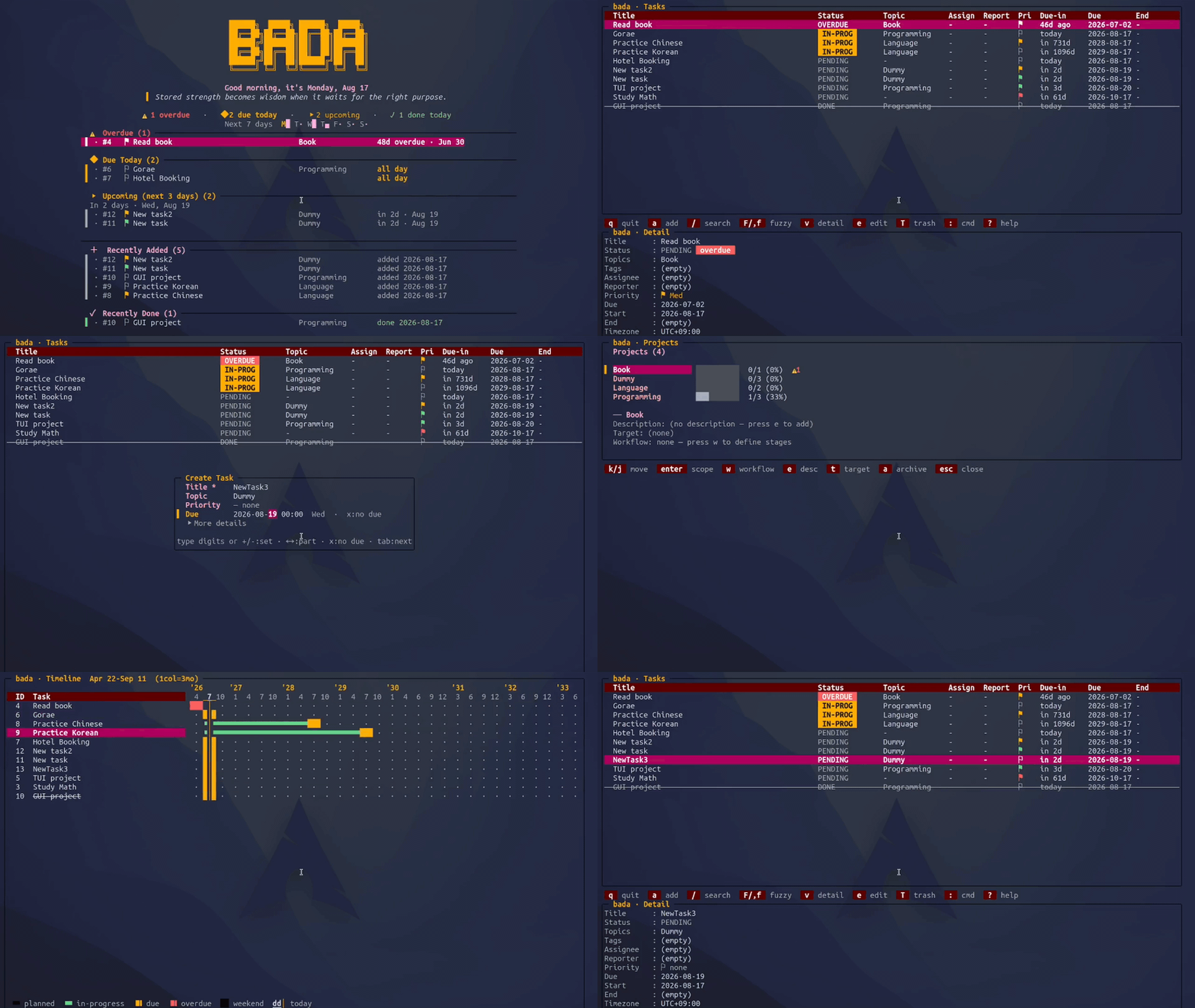
:agenda opens with a triage summary, a completion streak, and a seven-day sparkline. It then groups tasks into Overdue, Due Today (laid out as a schedule), Upcoming, Recurring, No Date, and Recently Added/Done. Press z to fold the header when you only want the list.
Act directly from the agenda: r rotates status, [ and ] reschedule by a day, and e opens the editor. Your morning review never has to bounce between screens. Scope the list to a topic, and the agenda narrows with it.
📅 Calendar and 📊 Gantt
:calendar gives you a month grid: h/l moves by day, j/k by week, and H/L by month. Press Enter to see a day’s tasks. :gantt places start and due dates on a timeline with a marker for today—the fastest way to notice that three deadlines have quietly landed in the same week.
📈 Statistics
:stats is the honest mirror: completions today, this week, and this month; current and longest streaks; a seven-day chart; and pending work broken down by priority and topic. Streaks may be a cheap trick, but they work.
Projects That Fit Your Process
This is where Bada stops being a to-do list.
In Bada, topics double as projects. Open :projects for the overview—each one shows a completion bar, overdue count, and stage funnel.
Custom status workflows. The default pipeline is PENDING → IN-PROGRESS → DONE: fine for chores, but often too simple for project work. Press w on a project to define your own ordered stages. A paper might move through writing → review → submission → rebuttal. Each stage has a category—pending, active, or done—that determines its color. Rotating a task into the final done stage completes it just like the built-in workflow.
A task’s workflow comes from its primary topic (the first one listed); the rest stay plain labels. So adding custom pipelines never disturbs tasks that didn’t ask for them.
Kanban. :kanban renders those stages as columns. Use h/l to move between columns, j/k to move between tasks, and L/H to push work forward or send it back.
Linked Git repositories. Press g on a project to link a local repository. Tab completes filesystem paths and marks Git repositories with ●, so you can find the right one without leaving the TUI. Then press L (or run :gitlog) to browse commit hashes, dates, authors, and subjects; Enter opens git show --stat. History loads in the background, so even a large repository won’t block the UI, and Bada only ever reads it. It’s a small feature that answers a useful question—“What did I actually ship on this project last week?”—without making you switch windows.
Details Where You Need Them
The create/edit dialog opens over a dimmed list. New tasks show only Title, Topic, Priority, and Due, plus a ▸ More details row that reveals tags, assignee, reporter, start and end dates, timezone, recurrence, interval, and notes. This progressive disclosure keeps capture quick while leaving the full set of metadata close at hand.
A few touches that matter in daily use:
- Due is a date stepper, not a text field.
←/→select the year, month, day, hour, or minute; number keys enter a value and advance;+/-step it; andxclears it. - Topic and Tags open a dropdown of previously used values on
Tab, keeping your vocabulary from drifting intoml,ML, andmachine-learning. - Recurrence speaks plain English:
every day,every 3 days,every 2 weeks on Mon,every month on Fri. The UI previews the next occurrence. Ctrl+Ssaves from anywhere;Escdiscards.
Search comes in two flavors: / for text queries with scoped filters, and F for fuzzy matching. Quick filters are commands—:overdue, :today, :week, :pending, :done, and :stage <name>—with :all to clear them.
Local-First, and Recoverable
Tasks live in a local SQLite database under ~/.local/share/bada: no account, sync service, or network required. Configuration lives at ~/.config/bada/config.toml, and :config opens it in $EDITOR. Save and quit, and Bada reloads your theme and keybindings without restarting.
Deleted tasks go to Trash as JSON snapshots instead of vanishing. Press T to open Trash, select a task, then press u to restore it or P to purge it. In the main list, u undoes the last status, priority, due-date, or metadata change.
Bada ships with seven themes: light, dark, purple, ocean, forest, rose, and graphite. Press t to cycle through them or run :theme purple to jump to one; either way, Bada saves your choice. Every color can also be overridden under [theme], so you can start with a preset and adjust only the hues that bother you.
Getting Started
Bada supports Linux and macOS and needs Go 1.25.5 or newer.
git clone https://github.com/Han8931/bada.git
cd bada
./install.sh
bada
Or build without installing:
go build -o bin/bada ./cmd/todo
./bin/bada
The User Guide covers everything above in detail, and config.example.toml is the full configuration reference.
Honest Scope
Bada is a personal task manager. There’s no multi-user sync, no shared boards, and no notification service. The assignee and reporter fields help you track your own delegations; they aren’t meant for running a team. Import/export, reminders, and optional encrypted sync are on the roadmap, not available today.
If your work already lives in the terminal, your task manager should not force you to leave it just to remember what comes next. Bada fills the gap between a text file that cannot show the shape of a project and a project-management suite that becomes a destination of its own.